


 Home
Home Dark Mode Implementation For User Experience PPT Mockup AT
Elevate your design strategy with our Dark Mode Implementation for User Experience PowerPoint presentation. This comprehensive deck outlines key principles benefits and best practices for integrating dark mode into digital interfaces enhancing user engagement and satisfaction. Transform your projects and captivate your audience today.








-

- Google Slides is a new FREE Presentation software from Google.
- All our content is 100% compatible with Google Slides.
- Just download our designs, and upload them to Google Slides and they will work automatically.
- Amaze your audience with SlideGeeks and Google Slides.
-

Want Changes to This PPT Slide? Check out our Presentation Design Services
-

- WideScreen Aspect ratio is becoming a very popular format. When you download this product, the downloaded ZIP will contain this product in both standard and widescreen format.
-

- Some older products that we have may only be in standard format, but they can easily be converted to widescreen.
- To do this, please open the SlideGeeks product in Powerpoint, and go to
- Design ( On the top bar) -> Page Setup -> and select "On-screen Show (16:9)” in the drop down for "Slides Sized for".
- The slide or theme will change to widescreen, and all graphics will adjust automatically. You can similarly convert our content to any other desired screen aspect ratio.
Compatible With Google Slides

Get This In WideScreen
You must be logged in to download this presentation.


Do you want to remove this product from your favourites?
 Impress Your
 Audience
 100%
100% Editable
Compatible with Google Slides
Features of these PowerPoint presentation slides:
Ditch the Dull templates and opt for our engaging Dark Mode Implementation For User Experience PPT Mockup deck to attract your audience. Our visually striking design effortlessly combines creativity with functionality ensuring your content shines through. Compatible with Microsoft versions and Google Slides it offers seamless integration of presentation. Save time and effort with our predesigned PPT layout while still having the freedom to customize fonts colors and everything you ask for. With the ability to download in various formats like JPG JPEG and PNG sharing your slides has never been easier. From boardroom meetings to client pitches this deck can be the secret weapon to leaving a lasting impression. Elevate your design strategy with our Dark Mode Implementation for User Experience PowerPoint presentation. This comprehensive deck outlines key principles benefits and best practices for integrating dark mode into digital interfaces enhancing user engagement and satisfaction. Transform your projects and captivate your audience today.
People who downloaded this PowerPoint presentation also viewed the following :
Related Products



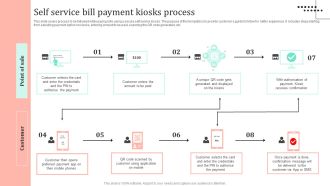

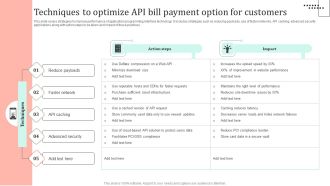
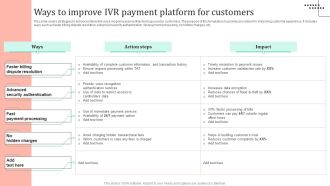

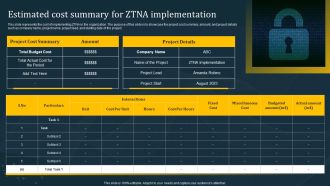

Dark Mode Implementation For User Experience PPT Mockup AT with all 34 slides:
Use our Dark Mode Implementation For User Experience PPT Mockup AT to effectively help you save your valuable time. They are readymade to fit into any presentation structure.
Most Relevant Reviews
No Reviews