


Software Defined Perimeter PowerPoint Presentation Templates and Google Slides
-
Page
-

- Page 1
- You're currently reading page 2
-
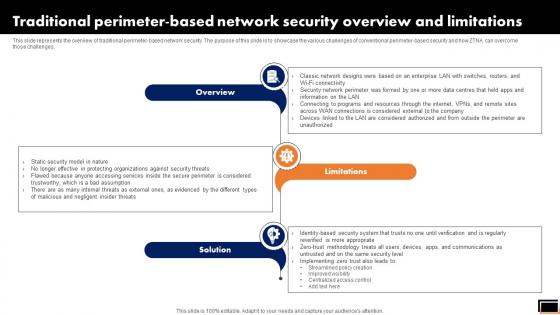
Traditional Perimeter-Based Network Security Overview And Limitations Software Defined Perimeter SDP
This slide represents the overview of traditional perimeter-based network security. The purpose of this slide is to showcase the various challenges of conventional perimeter-based security and how ZTNA can overcome those challenges. If you are looking for a format to display your unique thoughts, then the professionally designed Traditional Perimeter-Based Network Security Overview And Limitations Software Defined Perimeter SDP is the one for you. You can use it as a Google Slides template or a PowerPoint template. Incorporate impressive visuals, symbols, images, and other charts. Modify or reorganize the text boxes as you desire. Experiment with shade schemes and font pairings. Alter, share or cooperate with other people on your work. Download Traditional Perimeter-Based Network Security Overview And Limitations Software Defined Perimeter SDP and find out how to give a successful presentation. Present a perfect display to your team and make your presentation unforgettable. This slide represents the overview of traditional perimeter-based network security. The purpose of this slide is to showcase the various challenges of conventional perimeter-based security and how ZTNA can overcome those challenges.
-
Training Program For Zero Trust Network Access Model Software Defined Perimeter SDP
This slide outlines the training program for implementing the zero-trust network access model in the organization. The purpose of this slide is to highlight the training agenda, objectives, system requirements, mode of training and cost of the training. Crafting an eye-catching presentation has never been more straightforward. Let your presentation shine with this tasteful yet straightforward Training Program For Zero Trust Network Access Model Software Defined Perimeter SDP template. It offers a minimalistic and classy look that is great for making a statement. The colors have been employed intelligently to add a bit of playfulness while still remaining professional. Construct the ideal Training Program For Zero Trust Network Access Model Software Defined Perimeter SDP that effortlessly grabs the attention of your audience Begin now and be certain to wow your customers This slide outlines the training program for implementing the zero-trust network access model in the organization. The purpose of this slide is to highlight the training agenda, objectives, system requirements, mode of training and cost of the training.
-
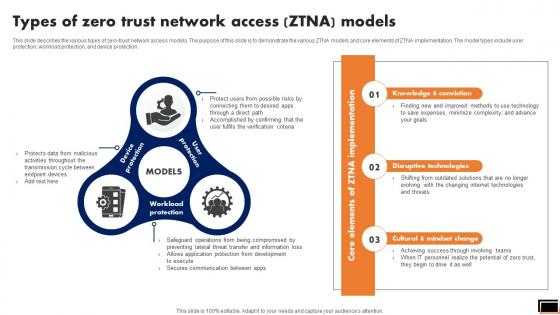
Types Of Zero Trust Network Access Ztna Models Software Defined Perimeter SDP
This slide describes the various types of zero-trust network access models. The purpose of this slide is to demonstrate the various ZTNA models and core elements of ZTNA implementation. The model types include user protection, workload protection, and device protection. Make sure to capture your audiences attention in your business displays with our gratis customizable Types Of Zero Trust Network Access Ztna Models Software Defined Perimeter SDP. These are great for business strategies, office conferences, capital raising or task suggestions. If you desire to acquire more customers for your tech business and ensure they stay satisfied, create your own sales presentation with these plain slides. This slide describes the various types of zero-trust network access models. The purpose of this slide is to demonstrate the various ZTNA models and core elements of ZTNA implementation. The model types include user protection, workload protection, and device protection.
-
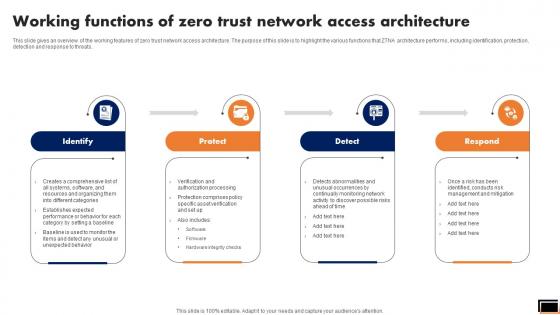
Working Functions Of Zero Trust Network Access Architecture Software Defined Perimeter SDP
This slide gives an overview of the working features of zero trust network access architecture. The purpose of this slide is to highlight the various functions that ZTNA architecture performs, including identification, protection, detection and response to threats. Formulating a presentation can take up a lot of effort and time, so the content and message should always be the primary focus. The visuals of the PowerPoint can enhance the presenters message, so our Working Functions Of Zero Trust Network Access Architecture Software Defined Perimeter SDP was created to help save time. Instead of worrying about the design, the presenter can concentrate on the message while our designers work on creating the ideal templates for whatever situation is needed. Slidegeeks has experts for everything from amazing designs to valuable content, we have put everything into Working Functions Of Zero Trust Network Access Architecture Software Defined Perimeter SDP. This slide gives an overview of the working features of zero trust network access architecture. The purpose of this slide is to highlight the various functions that ZTNA architecture performs, including identification, protection, detection and response to threats.
-
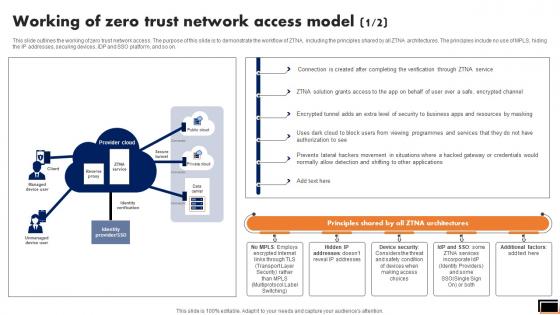
Working Of Zero Trust Network Access Model Software Defined Perimeter SDP
This slide outlines the working of zero trust network access. The purpose of this slide is to demonstrate the workflow of ZTNA, including the principles shared by all ZTNA architectures. The principles include no use of MPLS, hiding the IP addresses, securing devices, IDP and SSO platform, and so on. Coming up with a presentation necessitates that the majority of the effort goes into the content and the message you intend to convey. The visuals of a PowerPoint presentation can only be effective if it supplements and supports the story that is being told. Keeping this in mind our experts created Working Of Zero Trust Network Access Model Software Defined Perimeter SDP to reduce the time that goes into designing the presentation. This way, you can concentrate on the message while our designers take care of providing you with the right template for the situation. This slide outlines the working of zero trust network access. The purpose of this slide is to demonstrate the workflow of ZTNA, including the principles shared by all ZTNA architectures. The principles include no use of MPLS, hiding the IP addresses, securing devices, IDP and SSO platform, and so on.
-
Zero Trust Exchange Overview And Benefits Software Defined Perimeter SDP
This slide provides an overview of zero trust exchange and its benefits. The purpose of this slide is to highlight the key advantages of zero trust exchange to businesses including enhancing user experience, reducing internet attacks and later threat movement, lowering costs and complexity, and so on. This modern and well-arranged Zero Trust Exchange Overview And Benefits Software Defined Perimeter SDP provides lots of creative possibilities. It is very simple to customize and edit with the Powerpoint Software. Just drag and drop your pictures into the shapes. All facets of this template can be edited with Powerpoint, no extra software is necessary. Add your own material, put your images in the places assigned for them, adjust the colors, and then you can show your slides to the world, with an animated slide included. This slide provides an overview of zero trust exchange and its benefits. The purpose of this slide is to highlight the key advantages of zero trust exchange to businesses including enhancing user experience, reducing internet attacks and later threat movement, lowering costs and complexity, and so on.
-
Zero Trust Network Access Architectural Models Software Defined Perimeter SDP
This slide describes the main models of ZTNA architecture. The purpose of this slide is to showcase the two essential models of zero trust network access architecture, including client-based and browser-based. Both models perform security functions, including identity verification, access control, and data encryption. This Zero Trust Network Access Architectural Models Software Defined Perimeter SDP is perfect for any presentation, be it in front of clients or colleagues. It is a versatile and stylish solution for organizing your meetings. The Zero Trust Network Access Architectural Models Software Defined Perimeter SDP features a modern design for your presentation meetings. The adjustable and customizable slides provide unlimited possibilities for acing up your presentation. Slidegeeks has done all the homework before launching the product for you. So, do not wait, grab the presentation templates today This slide describes the main models of ZTNA architecture. The purpose of this slide is to showcase the two essential models of zero trust network access architecture, including client-based and browser-based. Both models perform security functions, including identity verification, access control, and data encryption.
-
Zero Trust Network Access Architecture Overview Software Defined Perimeter SDP
This slide gives an overview of zero trust network access architecture. The purpose of this slide is to showcase the ZTNA architecture and its benefits, covering granting safe and fast access, protecting reliable remote access, protecting sensitive data and apps, stopping insider threats, and so on. Welcome to our selection of the Zero Trust Network Access Architecture Overview Software Defined Perimeter SDP. These are designed to help you showcase your creativity and bring your sphere to life. Planning and Innovation are essential for any business that is just starting out. This collection contains the designs that you need for your everyday presentations. All of our PowerPoints are 100Percent editable, so you can customize them to suit your needs. This multi-purpose template can be used in various situations. Grab these presentation templates today. This slide gives an overview of zero trust network access architecture. The purpose of this slide is to showcase the ZTNA architecture and its benefits, covering granting safe and fast access, protecting reliable remote access, protecting sensitive data and apps, stopping insider threats, and so on.
-
Zero Trust Network Access Architecture Workflow Software Defined Perimeter SDP
This slide outlines the workflow of zero trust network access architecture. The purpose of this slide is to showcase the various steps of the ZTNA model workflow, including user authentication, grant access, monitoring of user sessions, and threat response. Explore a selection of the finest Zero Trust Network Access Architecture Workflow Software Defined Perimeter SDP here. With a plethora of professionally designed and pre-made slide templates, you can quickly and easily find the right one for your upcoming presentation. You can use our Zero Trust Network Access Architecture Workflow Software Defined Perimeter SDP to effectively convey your message to a wider audience. Slidegeeks has done a lot of research before preparing these presentation templates. The content can be personalized and the slides are highly editable. Grab templates today from Slidegeeks. This slide outlines the workflow of zero trust network access architecture. The purpose of this slide is to showcase the various steps of the ZTNA model workflow, including user authentication, grant access, monitoring of user sessions, and threat response.
-
Zero Trust Network Access Implementation Challenges Software Defined Perimeter SDP
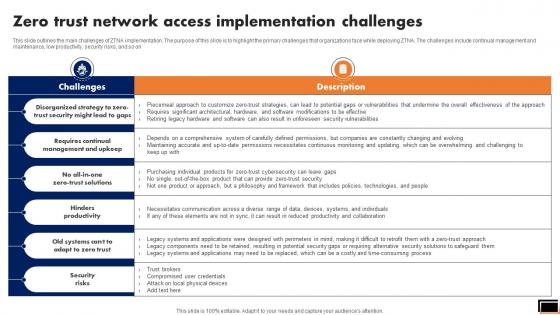
This slide outlines the main challenges of ZTNA implementation. The purpose of this slide is to highlight the primary challenges that organizations face while deploying ZTNA. The challenges include continual management and maintenance, low productivity, security risks, and so on. The best PPT templates are a great way to save time, energy, and resources. Slidegeeks have 100 percent editable powerpoint slides making them incredibly versatile. With these quality presentation templates, you can create a captivating and memorable presentation by combining visually appealing slides and effectively communicating your message. Download Zero Trust Network Access Implementation Challenges Software Defined Perimeter SDP from Slidegeeks and deliver a wonderful presentation. This slide outlines the main challenges of ZTNA implementation. The purpose of this slide is to highlight the primary challenges that organizations face while deploying ZTNA. The challenges include continual management and maintenance, low productivity, security risks, and so on.
-
Zero Trust Network Access Performance Tracking Dashboard Software Defined Perimeter SDP
This slide represents the performance tracking dashboard for zero trust network access. The purpose of this slide is to showcase the level of request modes, connected users, daily usage of the network, security rating, device risk and threat flow. The Zero Trust Network Access Performance Tracking Dashboard Software Defined Perimeter SDP is a compilation of the most recent design trends as a series of slides. It is suitable for any subject or industry presentation, containing attractive visuals and photo spots for businesses to clearly express their messages. This template contains a variety of slides for the user to input data, such as structures to contrast two elements, bullet points, and slides for written information. Slidegeeks is prepared to create an impression. This slide represents the performance tracking dashboard for zero trust network access. The purpose of this slide is to showcase the level of request modes, connected users, daily usage of the network, security rating, device risk and threat flow.
-
Zero Trust Network Access System Use Cases Software Defined Perimeter SDP
This slide outlines multiple use cases of zero-trust network access systems. The purpose of this slide is to showcase the main use cases of the ZTNA model, which are replacing VPN and MPLS connections, internal firewall replacement, securing remote access to private apps, limiting user access, and so on. Are you searching for a Zero Trust Network Access System Use Cases Software Defined Perimeter SDP that is uncluttered, straightforward, and original Its easy to edit, and you can change the colors to suit your personal or business branding. For a presentation that expresses how much effort you have put in, this template is ideal With all of its features, including tables, diagrams, statistics, and lists, its perfect for a business plan presentation. Make your ideas more appealing with these professional slides. Download Zero Trust Network Access System Use Cases Software Defined Perimeter SDP from Slidegeeks today. This slide outlines multiple use cases of zero-trust network access systems. The purpose of this slide is to showcase the main use cases of the ZTNA model, which are replacing VPN and MPLS connections, internal firewall replacement, securing remote access to private apps, limiting user access, and so on.
-
Zero Trust Network Access User Flow Overview Software Defined Perimeter SDP
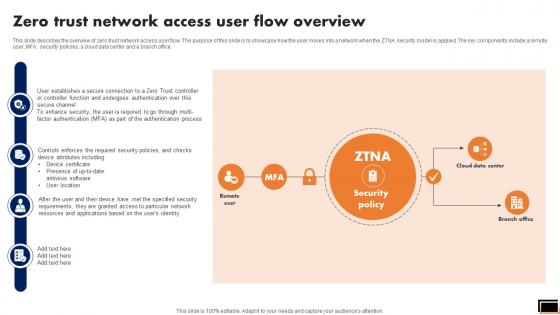
This slide describes the overview of zero trust network access user flow. The purpose of this slide is to showcase how the user moves into a network when the ZTNA security model is applied. The key components include a remote user, MFA, security policies, a cloud data center and a branch office. Retrieve professionally designed Zero Trust Network Access User Flow Overview Software Defined Perimeter SDP to effectively convey your message and captivate your listeners. Save time by selecting pre-made slideshows that are appropriate for various topics, from business to educational purposes. These themes come in many different styles, from creative to corporate, and all of them are easily adjustable and can be edited quickly. Access them as PowerPoint templates or as Google Slides themes. You do not have to go on a hunt for the perfect presentation because Slidegeeks got you covered from everywhere. This slide describes the overview of zero trust network access user flow. The purpose of this slide is to showcase how the user moves into a network when the ZTNA security model is applied. The key components include a remote user, MFA, security policies, a cloud data center and a branch office.
-
Zero Trust Network Access Ztna Introduction Software Defined Perimeter SDP
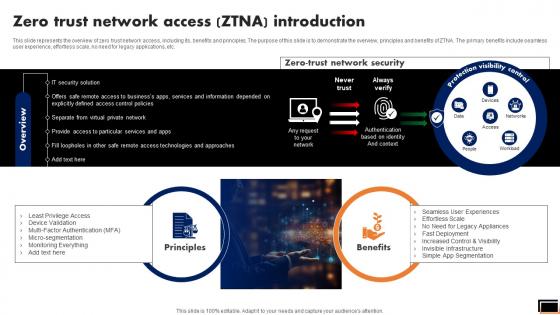
This slide represents the overview of zero trust network access, including its, benefits and principles. The purpose of this slide is to demonstrate the overview, principles and benefits of ZTNA. The primary benefits include seamless user experience, effortless scale, no need for legacy applications, etc. Here you can discover an assortment of the finest PowerPoint and Google Slides templates. With these templates, you can create presentations for a variety of purposes while simultaneously providing your audience with an eye-catching visual experience. Download Zero Trust Network Access Ztna Introduction Software Defined Perimeter SDP to deliver an impeccable presentation. These templates will make your job of preparing presentations much quicker, yet still, maintain a high level of quality. Slidegeeks has experienced researchers who prepare these templates and write high-quality content for you. Later on, you can personalize the content by editing the Zero Trust Network Access Ztna Introduction Software Defined Perimeter SDP. This slide represents the overview of zero trust network access, including its, benefits and principles. The purpose of this slide is to demonstrate the overview, principles and benefits of ZTNA. The primary benefits include seamless user experience, effortless scale, no need for legacy applications, etc.
-
Zero Trust Network Access Vs Virtual Private Network Software Defined Perimeter SDP
This slide describes the difference between zero trust network access and a virtual private network. The purpose of this slide is to showcase the flow of remote users in both networks. The comparison is based on user experience, cost savings, and network vs. application-level access. Slidegeeks has constructed Zero Trust Network Access Vs Virtual Private Network Software Defined Perimeter SDP after conducting extensive research and examination. These presentation templates are constantly being generated and modified based on user preferences and critiques from editors. Here, you will find the most attractive templates for a range of purposes while taking into account ratings and remarks from users regarding the content. This is an excellent jumping-off point to explore our content and will give new users an insight into our top-notch PowerPoint Templates. This slide describes the difference between zero trust network access and a virtual private network. The purpose of this slide is to showcase the flow of remote users in both networks. The comparison is based on user experience, cost savings, and network vs. application-level access.
-
Zero Trust Network Access Vs Zero Trust Architecture Software Defined Perimeter SDP
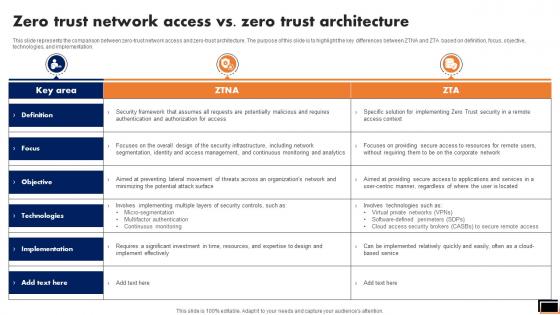
This slide represents the comparison between zero-trust network access and zero-trust architecture. The purpose of this slide is to highlight the key differences between ZTNA and ZTA based on definition, focus, objective, technologies, and implementation. Presenting this PowerPoint presentation, titled Zero Trust Network Access Vs Zero Trust Architecture Software Defined Perimeter SDP, with topics curated by our researchers after extensive research. This editable presentation is available for immediate download and provides attractive features when used. Download now and captivate your audience. Presenting this Zero Trust Network Access Vs. Zero Trust Architecture Software Defined Perimeter SDP. Our researchers have carefully researched and created these slides with all aspects taken into consideration. This is a completely customizable Zero Trust Network Access Vs. Zero Trust Architecture Software Defined Perimeter SDP that is available for immediate downloading. Download now and make an impact on your audience. Highlight the attractive features available with our PPTs. This slide represents the comparison between zero-trust network access and zero-trust architecture. The purpose of this slide is to highlight the key differences between ZTNA and ZTA based on definition, focus, objective, technologies, and implementation.
-
Traditional Security Models Vs Zero Trust Network Access Software Defined Perimeter SDP
This slide represents the comparative analysis between traditional security models and ZTNA. This slide highlights the main differences between ZTNA and conventional security models based on trust, foundation, dependence, visibility, attack surface and scaling. Are you in need of a template that can accommodate all of your creative concepts This one is crafted professionally and can be altered to fit any style. Use it with Google Slides or PowerPoint. Include striking photographs, symbols, depictions, and other visuals. Fill, move around, or remove text boxes as desired. Test out color palettes and font mixtures. Edit and save your work, or work with colleagues. Download Traditional Security Models Vs Zero Trust Network Access Software Defined Perimeter SDP and observe how to make your presentation outstanding. Give an impeccable presentation to your group and make your presentation unforgettable. This slide represents the comparative analysis between traditional security models and ZTNA. This slide highlights the main differences between ZTNA and conventional security models based on trust, foundation, dependence, visibility, attack surface and scaling.
-
Zero Trust Network Access Difference Between ZTNA And Software Defined Perimeter
This slide outlines the comparison between zero trust network access and software-defined perimeter. The purpose of this slide is to highlight the key difference between the two security approaches based on definitional, key features, deployment, use cases, benefits and challenges. The best PPT templates are a great way to save time, energy, and resources. Slidegeeks have 100 percent editable powerpoint slides making them incredibly versatile. With these quality presentation templates, you can create a captivating and memorable presentation by combining visually appealing slides and effectively communicating your message. Download Zero Trust Network Access Difference Between ZTNA And Software Defined Perimeter from Slidegeeks and deliver a wonderful presentation. This slide outlines the comparison between zero trust network access and software-defined perimeter. The purpose of this slide is to highlight the key difference between the two security approaches based on definitional, key features, deployment, use cases, benefits and challenges.









-
Page
-
- Page 1
- You're currently reading page 2